-
 May 14, 2026
How Access Control Systems Help Dallas Businesses Protect Employee-Only Areas?
Most Dallas businesses spend a lot of time thinking about outside threats. Fences, cameras, alarm systems. But the FBI’s data tells a different story: a significant share of workplace theft and data breaches comes from inside the building, often from people who already have a key card or a badge.
That is the problem access control systems for businesses in Dallas are actually built to solve.
This guide covers how modern access control works in practice, which industries need it most, and what Dallas businesses should look for when securing employee-only areas.
Why Employee-Only Areas Need More Than a Lock
Walk into most commercial buildings in Texas and you will find a handful of critical spaces that almost nobody thinks to protect properly: server rooms, inventory storage, executive offices, finance departments, medication storage in healthcare facilities, and loading docks in warehouses.
Each of those spaces holds something valuable. Financial records, proprietary data, expensive equipment, controlled substances, or raw inventory. A standard lock on the door slows someone down for about 30 seconds.
The real security gaps in most Dallas businesses include:
- Employees accessing areas beyond their job scope
- Terminated staff whose credentials were never revoked
- Vendors and contractors wandering into restricted zones
- No log of who entered what room and when
The businesses facing the most serious exposure operate in industries where a single breach can trigger regulatory fines or litigation: healthcare, financial services, technology companies, manufacturing plants, and retail warehouse operations.
Protecting these areas is not just about theft prevention. It is about compliance, liability, and keeping daily operations from being disrupted by incidents that should have been preventable.
What Modern Access Control Systems Actually Do
The employee area security system conversation has changed a lot in the last five years. These are not just electronic door locks. Modern systems handle permissions, monitoring, alerting, and reporting from a single platform.
Role-Based Access: Not Everyone Needs Every Door
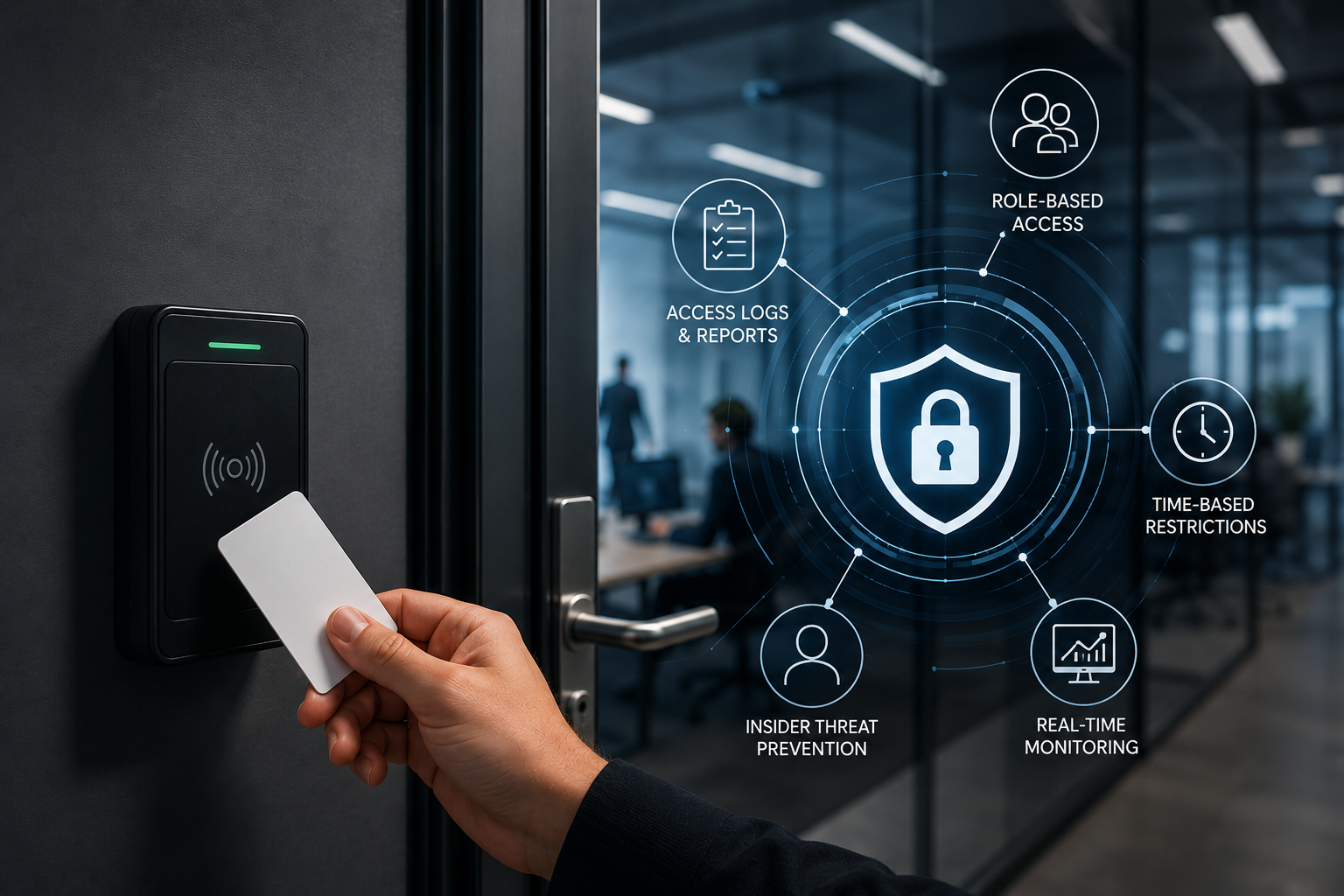
The most practical feature in any access control system for commercial buildings is role-based permissions. You assign access based on what each employee actually needs to do their job, not a blanket policy for the whole building.
IT staff get into server rooms. Finance gets into the records vault. Executives access the secure boardroom. Nobody gets into spaces they have no legitimate reason to enter.
This is not complicated to set up, but most businesses skip it because they are using traditional key systems that cannot be configured that precisely. Modern commercial access control eliminates that problem entirely. According to ASIS International, access control is one of the most cost-effective ways to reduce insider threat exposure in commercial settings.
Time-Based Restrictions: After-Hours Is High-Risk Time
A lot of workplace incidents happen outside normal business hours. An employee area security system in Dallas that uses time-based access restrictions can automatically cut off access after 6 PM, block weekend entry for non-essential staff, issue temporary credentials for contractors that expire the moment the job ends, and flag any access attempt outside approved hours.
This one feature alone eliminates a large category of risk that most businesses do not think about until something goes wrong.
Real-Time Monitoring: See What Is Happening As It Happens
Entry monitoring for commercial buildings in Texas has moved well beyond reviewing footage after the fact. Current systems give facility managers and security teams a live dashboard that shows:
- Who is in the building right now
- Which doors have been opened or held open
- Failed access attempts by time and location
- Movement patterns that look out of the ordinary
When something unusual happens, the system sends an alert immediately. Security teams can respond before a situation escalates instead of reviewing logs the next morning to figure out what happened.
This kind of real-time visibility is especially relevant for businesses managing multiple locations across the Dallas-Fort Worth area. A centralized dashboard means one administrator can monitor access activity across every building from a single screen.
The Insider Threat Problem Dallas Businesses Underestimate
Here is something that does not get discussed enough: most access-related incidents are not dramatic break-ins. They are quiet.
An employee who got passed over for a promotion starts accessing financial files they have no reason to open. A contractor finishes their contract but their credentials still work three months later. A disgruntled worker walks into the server room after hours and nobody notices until the next audit.
Preventing insider threats through commercial building access control involves:
- Limiting permissions to only what each role requires
- Maintaining a complete activity log that records every access event
- Automatically revoking credentials the moment employment ends
- Getting alerts on unusual access patterns before damage is done
The credential revocation piece is particularly important. Studies on workplace security consistently show that businesses take weeks on average to revoke access for departed employees. The Ponemon Institute’s research on insider threats shows that the average cost of an insider-related incident exceeds $15 million annually for large organizations.
With a modern access control system for businesses in Dallas, you revoke access in seconds from any device.
Which Dallas Industries Need Access Control Most
Every business benefits from controlled entry, but some industries carry more risk than others.
Healthcare facilities need to protect patient records, pharmaceutical storage, and restricted clinical areas. HIPAA compliance requirements make access logging not just a security feature but a legal obligation.
Financial institutions need to secure trading floors, vault access, and client record storage. Entry logs serve as both a security tool and an audit trail for regulatory bodies.
Technology companies need to lock down server infrastructure, R&D spaces, and any area handling proprietary code or client data.
Warehouses and distribution centers need granular control over loading docks, inventory storage, and shipping areas where shrinkage is both common and expensive.
Corporate offices need to separate departments, protect executive spaces, and manage visitor flow through facilities that may see dozens of contractors and vendors every week.
If your business handles sensitive information, expensive inventory, or regulated materials, a basic lock-and-key setup is not meeting the standard you actually need.
Also Read: Top Areas in Dallas That Need Business Surveillance Systems
How to Restrict Employee Access in Commercial Buildings in Dallas
Getting started is more straightforward than most businesses expect. The process breaks down into a few practical steps.
Step 1: Map your facility. Identify every area that has restricted access requirements. Rank them by sensitivity.
Step 2: Define access by role. For each area, specify which roles legitimately need access. If you cannot name a specific business reason, that is a red flag.
Step 3: Choose your system type. The most common options for commercial buildings in Dallas are:
- Keycard and fob systems for general access management
- Biometric access control for high-security areas where identity verification needs to be airtight
- Mobile-based access control that uses employee smartphones as credentials
- Cloud-based systems for businesses managing multiple locations
Step 4: Set up monitoring and alerts. Access restriction without monitoring is incomplete. Configure real-time alerts for after-hours activity, failed attempts, and forced door events.
Step 5: Establish a credential management process. Someone needs to own the process of granting, modifying, and revoking access. This should be tied directly to your HR onboarding and offboarding workflow.
Professional installation matters here. A system that is misconfigured at the hardware level creates gaps that no software feature can fix. NIST’s guidelines on physical access control provide a solid framework for businesses designing a credentialing process.
Entry Monitoring for Commercial Buildings in Texas: What Good Looks Like
Monitoring is the part of the system that most businesses set up and then never actually use. That is a wasted asset.
Effective commercial building entry monitoring in Texas means your team is actively reviewing alerts, not just storing logs. It means running periodic access audits to catch permission drift, where employees accumulate more access over time simply because nobody removed what they no longer need.
It also means having a clear process for what happens when an alert fires. Who gets notified? What is the escalation path? How fast does someone respond?
The businesses that get the most value from access control systems are the ones that treat monitoring as an ongoing process, not a set-it-and-forget-it installation.
Frequently Asked Questions
What areas in a Dallas commercial building should be restricted with access control?
Server rooms, IT infrastructure, executive offices, finance and accounting areas, inventory and warehouse storage, medication storage in healthcare facilities, and any room containing sensitive client or employee data.
How do access control systems prevent insider theft in Dallas businesses?
By limiting each employee’s access to only the areas their role requires, maintaining a timestamped log of every entry event, and revoking credentials instantly when employment ends. This removes the opportunity for unauthorized access rather than relying on trust alone.
What is the difference between role-based and time-based access control?
Role-based access grants or denies entry based on the employee’s job function. Time-based access adds a scheduling layer, so even authorized employees cannot enter certain areas outside approved hours. Most commercial systems use both together.
Can access control systems integrate with existing HR software?
Yes. Most modern cloud-based access control platforms support integration with HR and identity management systems. When an employee is offboarded in the HR system, access credentials can be revoked automatically across all doors and locations.
How does entry monitoring work in commercial buildings in Texas?
The system logs every access event with a timestamp and the credential used. Security administrators can review live activity from a dashboard, set up real-time alerts for suspicious events, and pull historical reports for audits or incident investigations.
What types of access control systems are used in Dallas commercial buildings?
The most common types are keycard or fob systems, biometric readers (fingerprint or facial recognition), mobile-based credentials using smartphones, and cloud-based systems that allow remote management across multiple locations.
How quickly can credentials be revoked when an employee leaves the company?
With a cloud-based system, credentials can be revoked in seconds from any internet-connected device. This is a significant improvement over traditional key systems, where rekeying or key recovery can take days.
Do access control systems help with regulatory compliance in Texas?
Yes. Businesses in healthcare, financial services, and technology are often required to demonstrate controlled access to sensitive areas. Access logs serve as audit evidence for HIPAA, PCI-DSS, SOX, and other compliance frameworks.
What is the average cost of installing an access control system for a Dallas business?
Costs vary based on building size, number of access points, and system complexity. Basic systems for small offices start at a few thousand dollars. Enterprise systems for large multi-location operations range considerably higher. A custom quote from a local installer is the most accurate way to budget.
Should Dallas businesses choose professional installation or DIY for access control?
Professional installation is the right choice for commercial applications. Proper hardware placement, network configuration, and system testing require technical expertise. A misinstalled system can create security gaps that defeat the purpose of having the system at all.
Our Service Area
- Anna
- Ardmore
- Aubrey
- Bridgeport
- Briar
- Bonham
- Caddo Mills
- Carrollton
- Celina
- Commerce
- Corinth
- Denton
- Keller
- Justin
- Emory
- Farmersville
- Forney
- Fort Worth
- Frisco
- Gainesville
- Granbury
- Lantana
- Lewisville
- Lavon
- Little Elm
- McKinney
- Murphy
- Nevada
- Northlake
- Pilot Point
- Plano
- Princeton
- Quinlan
- Rhome
- Rockwall
- Royse
- Sachse
- Saginaw
- Sanger
- Sherman
- Sulphur Springs
- Sunnyvale
- Terrell
- Van Alstyne
- Prosper
- Wylie
- Weatherford