
 Apr 11, 2025
Electronic Access Control vs Traditional Locks
Electronic Access Control vs Traditional Locks
Safety has become an often-concerning factor for any business in a fast-paced and technology-driven environment, from small offices and retail stores to large corporate facilities. For physical assets, sensitive data, and employee safety, vigilance isn’t enough to protect you, the right infrastructure is essential in ensuring that protection. One key element of that infrastructure is how you control access to your premises.
Since then, access control has changed quite a bit. Mechanical locks and keys were never going to be able to compare to these new electronic access control systems that offered greater flexibility, tracking, and integration with other security technologies. This paradigm shift reflects the growing need for intelligent, flexible systems to meet the demands of contemporary security threats.
This post is designed especially for business owners and decision-makers when considering the choices available. We’ll weigh up the pros and cons of each access control solution so you can make an informed decision that’s right for your business. By the time you finish reading, you’ll have a better idea of which option suits your security needs and long-term goals.
What Are Traditional Locks?
Traditional locks are mechanical locking systems without digital or electronic components. They need to be physically engaged, often by actually inserting a key to lock or unlock. Common types include deadbolts, padlocks, lever locks, and key-and-tumbler systems. These locks have been widely used for decades and still represent the dominant option in many small-scale business environments.
Key Characteristics
- Manual Operation: Traditional locks operate completely mechanically. They are simple, easy to use, require very little training or no digital interface, and physically require a user to turn a key or manipulate the locking mechanism by hand.
- Physical Keys: Access by a physical key; this key may be duplicated and given to others. Conversely, this also carries the risk of keys becoming misplaced or even unauthorised copies being made, which is a definite security concern.
- Low Upfront Cost: These locks are also affordable to buy and install, making them an option for small businesses with limited security budgets or low-risk environments.
Where They’re Commonly Used
Small offices, storage rooms, and low-security areas with traditional locks are common. And sometimes, they are used as backups at more secure facilities that depend on electronic systems.
- Card readers
- Biometric readers
- Keypad readers
Pros of Traditional Access Control
- Simple to use and maintain
- No dependence on power or the internet
- Budget-friendly for small businesses
- Quick installation and replacement
Cons of Traditional Access Control
- Keys can be lost or copied
- No access logs or audit trails
- Limited scalability for larger operations
- Vulnerable to picking or forced entry
What Is Electronic Access Control?
Electronic Access Control (EAC), a form of security system, defines who can enter or access the different zones of a business space or facility. EAC systems use digital credentials (key cards, biometric data, PIN codes, or mobile apps) instead of the traditional lock-and-key approach. In addition to increasing security, these systems offer a flexible and scalable solution for monitoring access to sensitive or restricted areas.
Key Components of Electronic Access Control Systems:
- Access Control Panels: These are the main devices that connect with all access points (doors, gates, etc.) and manage communication between credentials and the software system. The control panel evaluates a provided credential and either grants or denies access according to specific rules.
- User Credentials: Credentials may be RFID cards, biometrics (fingerprint, etc., facial recognition), PIN codes, or mobile access via smartphones. Each credential is unique and linked to user-specific levels of access, enabling enterprises to decide to control who enters what area and when.
- Access Control Software: This software handles permissions, tracks user activity , and allows administrators to set time-based access rules. At the same time, it can issue alerts in real time, maintain an audit trail, and integrate with other security systems, such as CCTV and alarm systems.
Common Use Cases of Electronic Access Control for Businesses
Electronic Access Control (EAC) solutions are used widely across many industries to improve physical security, simplify access, and protect sensitive data. Here’s a breakdown of how various business types use EAC systems:
Corporate Offices
In corporate settings, EAC systems control employee and visitor access. Businesses can manage access to levels, floors, or rooms according to roles and responsibilities.
- Data rooms, finance offices, and executive suites often use key card access or biometric authentication for enhanced security in sensitive areas.
- Taking this to another level, you can even time-limit and monitor visitors’ access using mobiles or temporary credentials, which helps with security and convenience.
- Access can also be revoked immediately in case of employee turnover, and there is no need to change locks.
Hospitals and Healthcare Facilities
Security is of utmost importance as healthcare environments deal with critical medical equipment and sensitive data.
- EAC can provide very tight control for patient records, labs, pharmacy storage, and operating rooms.
- Staff identification may be conducted through biometric scanners and/or PIN codes, restricting access to individualized personnel.
- Integration with hospital management systems ensures compliance with health data protection laws (HIPAA in the U.S., for instance).
Educational Institutions
Schools, colleges, and universities are required to safeguard multiple facilities whilst effectively controlling access to a vast community of students, employees, and visitors.
- An EAC system controls each point of access to classrooms, dormitories, administrative offices, laboratories, and more.
- Adjusting access permissions can also restrict entry to particular periods, preventing late-night security breaches.
- In emergencies, the system can also automatically lock or unlock certain buildings for safety protocols.
Data Centers
Data centers host mission-critical servers and IT infrastructure needing high-level security.
- Multi-factor authentication methods (i.e., key card + fingerprint) will prevent unauthorized staff from entering these specific server rooms.
- All access is tracked in real time to provide a detailed audit trail for compliance and incident investigations.
- Some EAC systems combine with video surveillance to visually capture access events, too.
Government Buildings
Government facilities manage confidential data and typically fall under strict regulatory controls.
- EAC systems use a secure credential approach (smart cards, biometrics) to apply security zones based on clearance levels.
- It can be programmed for audit readiness, monitoring , and tracking access for possible local or federal compliance.
- Integration with emergency response systems enables lockdowns or immediate access revocation during crises.
Pros of Electronic Access Control
- Offers flexible and scalable access management.
- Reduces the risk of unauthorized access and physical key duplication.
- Tracks entry/exit logs, aiding security audits and investigations.
Cons of Electronic Access Control
- Higher upfront costs for installation and setup.
- Requires regular software updates and credential management.
- System failure or power outage may affect accessibility unless backed up.
Feature-by-Feature Comparison: Electronic Access Control vs Traditional Locks for Businesses
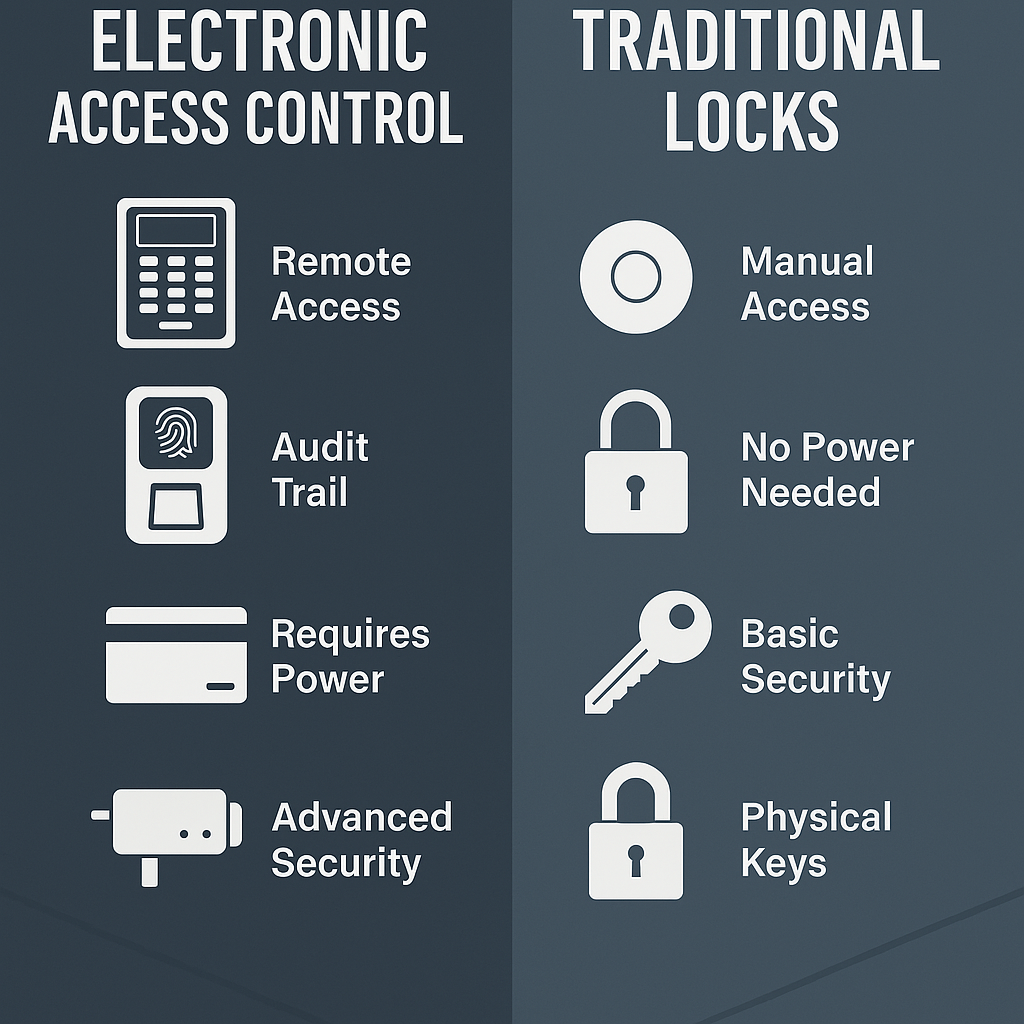
The decision to use electronic access control systems or traditional mechanical locks to secure commercial spaces can have a significant impact on safety, efficiency, and scalability. Here’s an extensive comparison across the primary categories you’ll want to consider for business decision-making:
Security & Risk Management
Electronic Access Control: With electronic systems, businesses can give access using keycards, PINs, biometrics, or mobile credentials and restrict them as needed. This greatly decreases the possibility of unauthorized access, as permissions can be set up individually and revoked immediately if required.
Traditional Locks: Electronic door locks do not use physical keys that are easy to lose, steal, or copy without authorization. If there is a lost key, you will have to replace your entire lock system, which is costly, inconvenient and potentially leaves your property at risk.
Access Flexibility
Electronic Access Control: Permissions can be updated remotely, making it ideal for businesses with constantly evolving teams or contractors. This allows admins to quickly grant, change, or remove access to individual doors without having to issue physical keys.
Traditional Locks: Mechanical keys do not support remote access ability. Key distribution, or locks rekeying (the only option for changes in access needs), would be inefficient and insecure for high-paced environments. Duplicating keys may also leave the door open to unauthorized access.
Scalability
Electronic Access Control: Scalable solution for growing businesses. Access levels can be configured for different employees, departments, or periods, and new doors or users can be added without needing hardware replacement.
Traditional Locks: Scaling is slow and not cost-effective for companies with lots of people. This is difficult to manage, and over time, physical keys can get lost, misplaced, or duplicated.
Audit Trails & Monitoring
Electronic Access Control: Enables real-time logs of entry and exit. It enables businesses to track who accessed which areas on time to hold them accountable and validate reporting incidents or compliance.
Traditional Locks: There is no way to track who entered the space or when. One can not effectively investigate access-related incidents without monitoring.
Installation & Maintenance
Electronic Access Control: The installation is more complex and generally needs professional installation and IT integration. Software updates also require ongoing maintenance and may require other hardware components like card readers and power supplies.
Traditional Locks: Mechanical locks are simple to install and maintain. They typically need little maintenance and are affordable for small areas or temporary use.
Emergency & Power Failure Considerations
Electronic Access Control: Modern systems have battery backups and can be set up in fail-safe (unlock) or fail-secure (stay locked) mode, depending on safety requirements. This allows them to run securely, even during outages or emergencies.
Traditional Locks: Mechanical locks are not dependent on power, so they do not rely on electricity to function. However, they do not account for any flexibility in how they respond to emergencies.
Conclusion
Access control was once a luxury but is now a basic requirement for successful security. From securing physical premises to controlling digital entry points, the best system helps to protect people, property, and information.
Selecting the right solution will vary based on your business size, security needs, and budget. Whether for a quick deployment or a more complex modular as well as integrated system, getting it right starts with your requirements.
Are you ready to step up your security? Contact us today for a free quote or to request our access control checklist to help you get started with confidence.
Our Service Area
- Anna
- Ardmore
- Aubrey
- Benbrook
- Bridgeport
- Briar
- Bonham
- Caddo Mills
- Carrollton
- Celina
- Commerce
- Corinth
- Denton
- Keller
- Justin
- Emory
- Farmersville
- Flower Mound
- Forney
- Fort Worth
- Frisco
- Gainesville
- Granbury
- Lantana
- Lewisville
- Lavon
- Little Elm
- McKinney
- Murphy
- Nevada
- Northlake
- Pilot Point
- Plano
- Princeton
- Quinlan
- Rhome
- Rockwall
- Royse
- Sachse
- Saginaw
- Sanger
- Sherman
- Sulphur Springs
- Sunnyvale
- Terrell
- Van Alstyne
- Prosper
- Wylie
- Weatherford
HOURS OF OPERATION
Monday through Friday :
9:00 am to 6:00 pm
After hours and weekend
CORPORATE OFFICE
1509 W Hebron Parkway
Suite Number 150
Carrollton, TX 75010