
Security Systems & CCTV Camera Installation for Financial Institutions in Dallas
A financial institution is not a typical office. You have cash in the building. You have vaults and safe deposit areas that need controlled access around the clock. You have teller stations where employees handle transactions in front of customers. You have server rooms with sensitive financial records. You have multiple entrances that customers, employees, vendors, and service personnel all use at different times. On top of that, many financial facilities operate multiple branches. A credit union with three locations in Dallas has three different building layouts, three sets of entry points, and three parking areas to monitor. Each one needs a security approach that fits its specific layout. That is why off-the-shelf cameras mounted in a few corners rarely cover what a bank or financial office actually needs. The security system has to account for customer-facing areas, employee-restricted zones, cash handling, after-hours protection, and the ability to review footage when something happens. Security In DFW works with financial institutions across Dallas-Fort Worth to design, install, and maintain commercial security systems built around these requirements. This page explains how security cameras, access control, intrusion detection, and alarm monitoring fit together for banks, credit unions, and other financial facilities in Dallas.
Financial Security at a Glance
Security Systems for Financial Institutions in Dallas
When we talk about a security system for a financial institution, we are not talking about a single product. We are talking about multiple systems designed to protect different parts of the building, working together. A typical financial institution security system can include some or all of the following:
CCTV and video surveillance
Cameras covering entrances, lobbies, teller counters, hallways, parking areas, ATMs, and restricted zones. Footage is recorded, stored, and can often be viewed remotely.
Access control
Electronic systems that determine who can enter specific doors, halls, or rooms. This includes card readers, fobs, mobile credentials, keypads, and biometric options for high-security areas.
Intrusion detection
Sensors on doors, windows, and other entry points that identify unauthorized entry or forced access. These typically tie into the alarm system.
Alarm systems
Audible or silent alerts triggered by intrusion sensors, panic buttons, or other security events. Many financial institutions use monitored alarms connected to a central station.
Monitoring
Some institutions use 24/7 professional monitoring so that alerts are reviewed and dispatched even when no one is on-site.
Emergency and panic systems
Panic buttons at teller stations and management desks that can silently trigger an alert during a security event. Not every financial facility needs every component. A single-office mortgage company has different needs than a full-service bank with a vault, drive-through lanes, and an ATM. The right combination depends on the facility, the number of entry points, the types of transactions happening inside, and what areas need controlled access.
Common Security System Components for Financial Institutions
| System | What It Does | Where It Applies |
|---|---|---|
| CCTV / Video Surveillance | Records activity at cameras positioned throughout the facility | Entrances, lobbies, teller areas, hallways, parking, ATMs, restricted zones |
| Access Control | Controls who can open specific doors using credentials, cards, or biometrics | Employee entrances, vaults, server rooms, records rooms, management offices |
| Intrusion Detection | Identifies unauthorized entry through doors, windows, or perimeter breaches | All exterior doors, windows, sensitive interior doors, after-hours zones |
| Alarm Systems | Generates alerts (audible or silent) when triggered by sensors or panic buttons | Teller stations, management offices, vault areas, building perimeter |
| Professional Monitoring | Central station reviews alerts and dispatches response 24/7 | Entire facility, especially after hours and weekends |
CCTV & Security Camera Installation for Banks and Financial Institutions
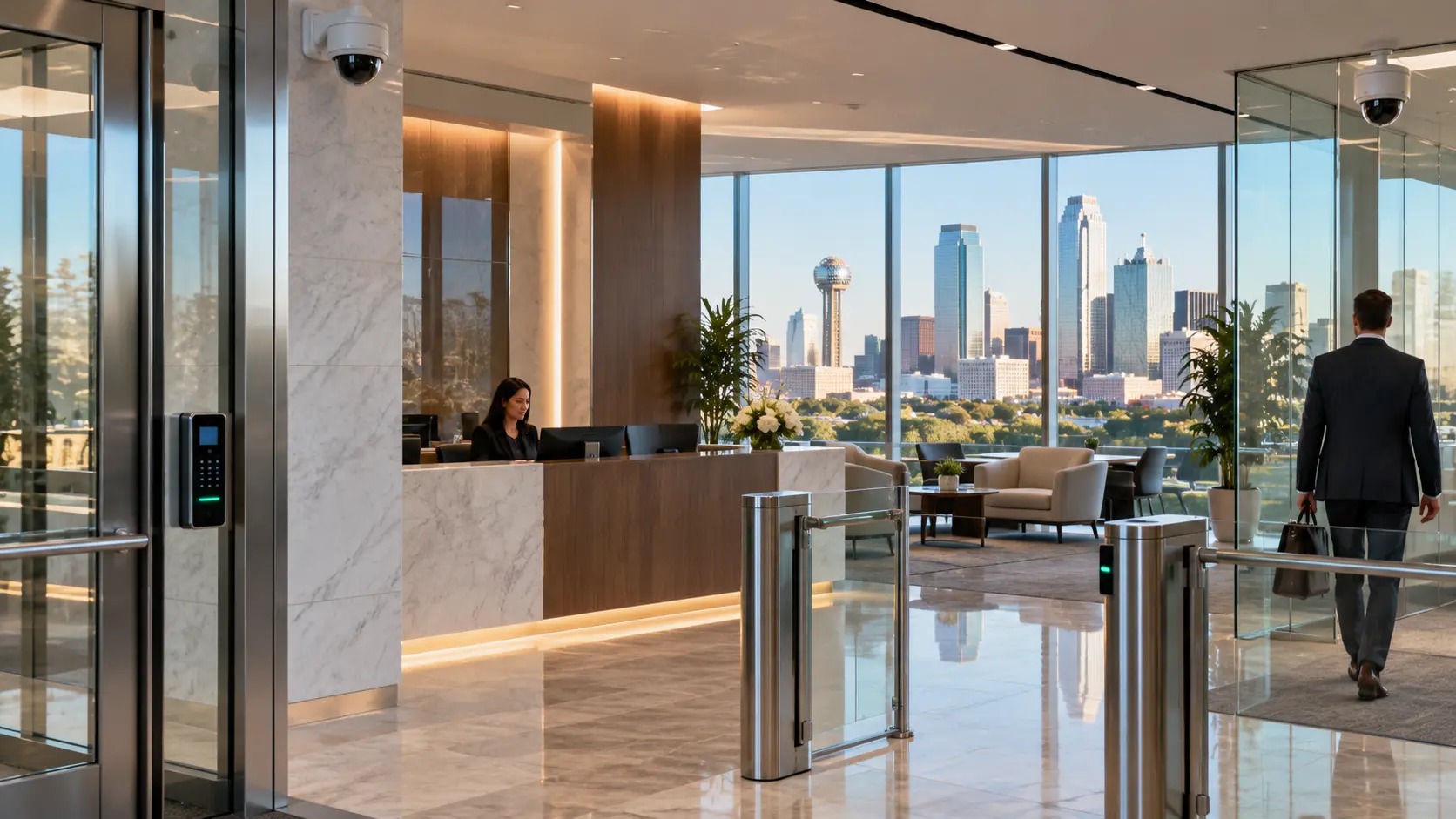
Buying cameras is the easy part. Placing them where they actually capture useful footage is the hard part. Professional security camera installation for a financial institution starts with walking the building and identifying what each camera needs to cover. That means examining every entrance and exit, every hallway, every customer-facing counter, and every area where cash or sensitive documents are handled. A few of the specific areas that typically need camera coverage in a bank or financial facility:
- ✓Main entrances and exits, including employee-only doors
- ✓Lobby and customer waiting areas
- ✓Teller counters and cash-handling stations
- ✓Drive-through windows and lanes
- ✓Hallways leading to restricted areas
- ✓Vault and safe deposit zones
- ✓ATM locations, both on-site and remote
- ✓Server and IT rooms
- ✓Parking lots and perimeter areas
- ✓Loading and delivery areas Camera placement also involves identifying blind spots. Corners, columns, alcoves, and hallways with odd angles can create gaps where footage does not capture faces or activity clearly. A camera placed six inches to the left might be the difference between a usable image and a blurry shape. Beyond placement, there are decisions about image resolution, storage capacity, and how long footage is retained. Financial institutions often need to retain video for longer periods than a typical retail store. Recording systems have to be sized for that. Remote viewing is another consideration. Many institutions want the ability to check camera feeds from a phone or computer, especially when managing multiple locations across Dallas. Commercial Security Camera Installation in Dallas
What Security Cameras Do Banks Use?
There is no single camera that works for every spot in a financial institution. Different areas have different lighting, different ceiling heights, different fields of view, and different priorities. Here is a breakdown of the most common camera types used in banks and financial facilities:
Dome cameras
Common in lobbies, hallways, and teller areas. The dome housing makes it harder for someone to tell exactly where the camera is pointed, which is useful in customer-facing spaces.
Turret cameras
Similar coverage to dome cameras but with less glare from the lens housing. A good option for areas with variable lighting.
Bullet cameras
Often used for perimeter coverage, parking lots, and exterior entry points. Their visible profile also serves as a visual deterrent.
PTZ cameras (pan-tilt-zoom)
Allow operators to adjust the view remotely. Useful for large lobbies or parking areas where you need the ability to follow activity in real time.
High-resolution IP cameras
Networked cameras that deliver sharp image quality and can be managed from a central system. Most modern financial institution installations use IP cameras.
Low-light and IR cameras
Designed for areas with limited lighting, such as parking garages, stairwells, and exterior areas at night.
Analytics-enabled cameras
Some IP cameras include built-in video analytics that can detect motion in specific zones, count people, or flag unusual activity patterns. The camera selection for any given project depends on ceiling height, lighting conditions, the area to be covered, resolution requirements, and budget. A teller counter might need a dome camera with facial-detail resolution, while a back parking lot might need a bullet camera with infrared capability. Security In DFW installs camera systems from manufacturers including Hikvision and VIVOTEK, selecting hardware based on the requirements of each project rather than defaulting to a single brand.
Security Camera Comparison: Common Types for Financial Institutions
| Camera Type | Best For | Typical Locations | Key Feature |
|---|---|---|---|
| Dome | Indoor areas, customer-facing spaces | Lobbies, teller areas, hallways | Discreet profile, hard to determine aim direction |
| Turret | Indoor/outdoor with variable light | Entrances, corridors, offices | Reduced lens glare vs. dome |
| Bullet | Long-range outdoor coverage | Parking lots, perimeter, building exterior | Visible deterrent, weather-resistant |
| PTZ | Large open areas needing adjustable view | Main lobby, large parking areas | Remote pan, tilt, and zoom control |
| IP / Network | Facilities needing centralized management | Any location, especially multi-branch setups | High resolution, network-based management |
| Low-Light / IR | Areas with poor or no lighting | Stairwells, parking garages, nighttime exterior | Clear images in darkness |
Access Control for Financial Institutions
Locking the front door does not solve the access problem for a financial institution. The real question is: who can get into which areas, and when? A bank branch might have a dozen areas where access needs to be managed differently. The front door is open during business hours, but the teller area behind the counter is restricted to employees. The vault has its own access layer. The server room has another. The manager’s office might be open during the day but locked after hours. Access control systems handle this by assigning different credentials to different people. An employee might have a keycard that opens the employee entrance and the break room but does not open the vault corridor. A branch manager might have credentials that also open the vault corridor and the IT closet. A cleaning crew might have access that only works between 7 PM and 10 PM. Common access control technologies used in financial institutions:
Key cards and fobs
The most common option. Employees tap a card or fob at a reader to unlock a door. If a card is lost, it can be deactivated immediately without rekeying the lock.
Mobile credentials
Some systems allow employees to use a smartphone app instead of a physical card. Convenient, but requires compatible hardware.
PIN and keypad entry
Often used as a second factor alongside a card. You tap your card and enter a PIN. This adds a layer of verification for sensitive areas.
Biometric systems
Fingerprint or other biometric readers for high-security areas like vaults or data centers. More common in larger institutions.
Electronic locks with door position monitoring
:The system knows whether a door is actually closed and latched after someone passes through, not just whether the lock was activated. An access control system also creates an audit trail. Every time someone uses their credential at a door, the system logs who, where, and when. If there is ever a question about who entered a restricted area at a specific time, the record exists.
Layered Security: How Cameras, Access Control, and Intrusion Detection Work Together
Individual security systems do their jobs. But when they are integrated, the whole setup becomes more useful than any single piece. Here is a practical example of how layered security works in a financial institution: 1. Access control restricts entry to the server room to credentialed employees only. 2. A camera covers the hallway leading to the server room door and the door itself. 3. An intrusion sensor on the server room door detects if the door is forced open without a valid credential. 4. If the sensor trips, the alarm system sends an alert to the monitoring station and can trigger the nearby camera to begin recording at a higher frame rate. 5. Staff or security personnel receive the alert and can pull up the camera feed to verify what happened. Without integration, you would have separate camera footage, a standalone alarm log, and an access control record that do not talk to each other. With integration, a single event ties together video, access data, and alarm information in one place. The level of integration depends on the system design, the equipment selected, and the facility’s requirements. Not every financial institution needs full integration across every door and camera. But for branches that handle cash, store sensitive records, or operate multiple locations, integration makes the system substantially more useful.
Security Challenges for Banks and Financial Institutions
Financial institutions deal with security concerns that most commercial offices never face. Some of the most common:
Unauthorized access to restricted areas
Vaults, cash rooms, and record storage need strict access control. A propped-open door or a shared keycard can compromise an entire zone.
Robbery and theft
Banks are targets. Camera coverage, panic buttons, and monitored alarms are designed to address this directly.
After-hours intrusion
Most break-ins happen when the building is empty. Intrusion detection sensors and after-hours monitoring provide coverage when employees are gone.
Internal security
Not all threats come from outside. Access control audit trails help identify who accessed what, and when.
Blind spots
Older buildings often have hallways, corners, or alcoves where existing cameras do not provide useful coverage.
ATM and remote locations
ATMs standing alone in a parking lot or attached to a building exterior have their own camera and monitoring requirements.
Multiple locations
A credit union with branches in Dallas, Plano, and Fort Worth needs a way to manage and review security across all three.
Customer safety
Customers expect to feel safe in a bank lobby. Visible cameras and controlled entry points contribute to that.
Aging equipment
Analog cameras and outdated access control systems installed years ago may no longer provide adequate coverage or image quality. Addressing these challenges starts with understanding where the facility is vulnerable. A professional security assessment identifies the specific issues before any equipment is selected.
**Need a security assessment for your financial institution in Dallas? ** Contact Security In DFW to schedule an on-site evaluation of your facility.
Security for Tellers, Customer Areas, and Restricted Areas
Not every room in a financial institution needs the same level of security. A customer lobby and a vault room have completely different risk profiles, and the security controls in each area should reflect that.
Customer-Facing Areas
The lobby and customer service areas are the most visible parts of the building. Customers walk in, wait, conduct business, and leave. Camera coverage here serves two purposes: it records what happens during transactions, and it gives customers a visible sign that the facility is monitored. Cameras in lobby areas should cover the entrance, the waiting area, and the path to teller stations. The goal is continuous coverage from the moment someone walks in to the moment they leave. Dome or turret cameras work well here because they blend into the ceiling without drawing attention.
Teller and Cash-Handling Areas
Teller stations are where cash changes hands. Camera placement in this zone needs to capture transaction activity clearly enough to identify faces and see what is happening at the counter. That usually means dedicated cameras aimed at each teller position, not a single wide-angle camera covering the entire counter from across the room. Panic buttons at teller stations are another standard element. These allow an employee to silently trigger an alert during a robbery or threatening situation. The alert goes to the monitoring station without any audible alarm that could escalate the situation inside the building.
Employee-Only Areas
Break rooms, back offices, and employee corridors need access control more than heavy camera coverage. The point is to make sure only authorized personnel enter these areas. A keycard reader on the door from the lobby to the employee area is a simple, effective control. That said, cameras in hallways leading to sensitive zones are still a good idea. If someone tailgates through a door behind an authorized employee, the camera captures it even if the access control log only shows one credential.
Sensitive and Restricted Areas
Vaults, cash counting rooms, safe deposit areas, server rooms, and records storage are the highest-security zones in the building. These areas typically get layered controls: access control on the door (sometimes requiring two credentials or a card plus PIN), cameras covering the entrance and interior, and intrusion sensors that activate when the area is supposed to be empty. For vault areas, some institutions also use door-position sensors that verify whether the vault door is fully closed and locked. If it is left ajar after hours, the system generates an alert.
Exterior and Parking Areas
The security perimeter does not stop at the front door. Parking lots, drive-through lanes, and building exteriors need camera coverage too. Bullet cameras with infrared capability handle outdoor areas well because they are weather-resistant and can capture usable footage at night. For institutions with ATMs attached to the exterior or located in separate kiosks, dedicated cameras should cover the ATM face, the approach, and the surrounding area.
Security Controls by Facility Zone
| Zone | Camera Priority | Access Control | Additional Controls |
|---|---|---|---|
| Customer Lobby | High — entrance to teller path coverage | Open during business hours | Visible camera presence |
| Teller / Cash Handling | High — per-position detail | Restricted to teller staff | Panic buttons, transaction cameras |
| Employee Areas | Moderate — hallway coverage | Keycard or credential required | Audit trail logging |
| Vault / Secure Storage | High — entrance and interior | Multi-factor or dual credential | Intrusion sensors, door-position monitoring |
| Server / IT Room | Moderate to high | Restricted — limited personnel | Environmental sensors where applicable |
| Parking / Exterior | High — perimeter and approaches | Gate or barrier where applicable | IR / night-vision cameras, lighting |
| ATM / Remote Locations | High — face, approach, and surround | Physical enclosure security | Dedicated recording, remote monitoring |


Security Systems for Credit Unions and Other Financial Institutions
When people think about bank security, they picture a large retail branch with tellers and a vault. But most financial institutions in Dallas do not look like that. Credit unions often operate smaller branch locations with open floor plans. An investment advisory firm might occupy a single suite in a commercial office building. A mortgage company might have a storefront office with a reception area and a handful of private offices. A corporate treasury department sits inside a larger office building and may need to secure only a few rooms within a shared floor. The security principles are the same — control access, monitor activity, detect unauthorized entry — but the scale and configuration are different. Here is how the approach applies across different types of financial facilities:
Credit unions
Often smaller branches with fewer teller positions. Camera coverage, access control on employee areas, and alarm monitoring cover the same fundamentals as a larger bank, just at a different scale.
Investment and wealth management offices
These may not handle cash, but they store sensitive client records and often meet with high-net-worth individuals. Access control on file storage areas and camera coverage at entry points are typical.
Mortgage and lending offices
Customer-facing offices where personal financial documents are collected and stored. Access control on document storage and cameras at the entrance and reception area are common.
Corporate financial offices and treasury departments
These are typically inside larger buildings. Security may focus on access control for specific rooms rather than the entire floor, with cameras on the doors to those rooms.
Financial service centers
Multi-tenant financial complexes with shared lobbies and individual suite access. Each tenant may need their own access control layer on top of the building’s system. Security In DFW works with all of these facility types in Dallas-Fort Worth. The system design starts with what the facility actually looks like and what areas need protection, not a one-size template.
Security System Installation for New and Existing Financial Facilities
Whether you are building a new branch from the ground up or upgrading security in a building that has been open for twenty years, the process is different. Both are common in Dallas, where new construction in growing areas like Frisco, McKinney, and Allen runs alongside renovations in established locations.
New Facility Installation
A new build is the easier scenario from a security installation standpoint because the infrastructure can be planned before the walls go up.
- ✓Camera locations are identified during the design phase, and cabling is run inside walls and ceilings before drywall is installed.
- ✓Access control points are planned alongside the door and hardware schedule. Readers, electric strikes, and wiring are installed as the doors go in.
- ✓Conduit runs for alarm sensors, panic buttons, and monitoring connections are laid during rough-in.
- ✓The recording system location — typically a secure IT closet or server room — is designated early so that network cabling is routed correctly. Planning security during construction avoids the messy, expensive problem of retrofitting later. Running cable through finished ceilings and walls costs more and takes longer.
Existing Facility Upgrades
Most financial institutions in Dallas are not building from scratch. They are working with buildings that already have some security equipment installed, sometimes dating back a decade or more. An existing-facility project typically starts with a security assessment:
- ✓What cameras are currently in place, and do they still provide adequate coverage and resolution?
- ✓Are there blind spots that were not addressed in the original installation?
- ✓Does the access control system support current credential types, or is it limited to older technology?
- ✓Is the recording system storing footage for long enough, and is the image quality usable?
- ✓Has the building layout changed since the original system was installed? New walls, relocated offices, or expanded areas may have created gaps.
- ✓Can the existing equipment integrate with newer components, or does the system need a full replacement? In some cases, the existing system is functional and just needs cameras added to cover new areas or access control extended to additional doors. In other cases, the entire system has reached end-of-life and a full replacement makes more sense than patching outdated equipment. Security In DFW evaluates what you already have before recommending new equipment. If existing cameras or access control hardware are still performing well, they can often be incorporated into an updated system design.
New Build vs. Existing Facility: Installation Comparison
| Factor | New Construction | Existing Facility |
|---|---|---|
| Cabling | Run inside walls during construction — cleaner, less labor | May require surface-mount conduit or ceiling runs in finished spaces |
| Camera Placement | Planned from blueprints with full flexibility | Constrained by existing structure, ceiling type, and wiring access |
| Access Control | Integrated with door hardware schedule from the start | Retrofitted to existing doors — may need new hardware or strikes |
| Cost Efficiency | Typically lower per-device install cost due to open walls | Higher labor for routing through finished spaces |
| Timeline | Installed alongside other trades during construction | Scheduled around business operations to minimize disruption |
| Existing Equipment | N/A — all new | Assessed for reuse, upgrade, or replacement |
Why Professional Security System Design Matters
A common mistake is picking cameras and equipment first and then figuring out where to put them. That approach often ends with cameras in the wrong spots, blind areas nobody accounted for, and an access control system that does not match the way people actually move through the building. Professional system design reverses that sequence. It starts with the building. An installer who designs the system around the facility will walk the building and ask questions like:
- ✓How many entrances does the building have, and which ones are customer-facing vs. employee-only?
- ✓Where are the cash handling areas, and what does the workflow look like at those stations?
- ✓Which rooms need restricted access, and who needs to get into each one?
- ✓Where are the existing cameras and access points, and are they still in the right locations?
- ✓What does the ceiling look like — drop ceiling, open plenum, concrete? That affects how cable is routed and where cameras can mount.
- ✓How many locations does the institution operate, and do they need centralized management?
- ✓What is the budget, and where does spending make the biggest difference? The answers to those questions determine the camera count, camera types, access control points, sensor locations, and recording system specifications. Equipment is selected to fit the design, not the other way around. This is the difference between a security system that covers the building and a collection of cameras that happen to be mounted on the walls.
Security System Maintenance, Upgrades, and Support
A security system is not something you install once and forget about. Cameras go out of alignment. Recording drives fill up or fail. Access control credentials need to be updated when employees join or leave. Firmware updates address vulnerabilities. Regular maintenance keeps the system working the way it was designed to:
Camera checks
Verifying that every camera is recording, aimed correctly, and producing usable image quality. A camera that shifted two inches during a ceiling repair might now be pointed at the top of a doorframe instead of the hallway.
Recording system health
Confirming that storage drives are functional, footage retention meets the facility’s requirements, and recordings are not being overwritten prematurely.
Access control updates
Adding new employee credentials, removing credentials for departed employees, and adjusting access schedules when business hours change.
Sensor and alarm testing
Periodically testing intrusion sensors, panic buttons, and alarm connections to make sure they trigger correctly.
System software and firmware
Keeping camera firmware, access control software, and recording system software up to date. Beyond routine maintenance, facilities change over time. A branch that adds a new office wing needs cameras and access control extended to that area. A credit union that remodels its lobby may need cameras repositioned. An institution that opens a new ATM location needs security coverage added. Security In DFW provides maintenance and support for the systems it installs, including troubleshooting, equipment replacement, coverage adjustments, and system expansion as your facility changes.
Need maintenance or upgrades for an existing security system? Contact Security In DFW to schedule a service visit or system review.
Professional Financial Institution Security System Installation in Dallas
Security In DFW provides commercial security system installation for financial institutions across the Dallas-Fort Worth area. That includes banks, credit unions, mortgage offices, investment firms, corporate financial offices, and ATM locations. The process starts with a conversation about your facility and a site visit. From there, the project follows a straightforward path:
Consultation
We discuss what you need the system to do, what areas need coverage, and any existing equipment you want to keep or replace.
Site assessment
An on-site walkthrough of the building to evaluate entry points, restricted areas, camera placement options, cabling paths, and infrastructure.
System design
A custom security plan built around your facility layout, coverage requirements, and budget. This includes camera locations, access control points, sensor positions, and recording system specifications.
Installation
Professional installation by licensed technicians. Cameras, access control readers, sensors, and recording equipment are installed, wired, configured, and tested.
Integration
Where the system design calls for it, cameras, access control, and alarm components are connected so they work together rather than as separate systems.
Training and handoff
Your team gets a walkthrough of the system, including how to view camera feeds, manage access credentials, and respond to alerts. Whether it is a single-branch credit union or a multi-location bank across Dallas-Fort Worth, the system is designed around the facility, not pulled from a template.
Need a security system for a bank, credit union, or financial facility in Dallas? Contact Security in DFW to discuss your facility and request an assessment.
Why Choose Security In DFW?
Licensed commercial security installer in Texas
Experience designing and installing security systems for financial institutions in Dallas-Fort Worth
Security camera installation, access control, intrusion detection, and alarm system integration
On-site assessments before any equipment is recommended
Custom system designs built around your facility, not a one-size approach
Installation, service, and support for both new and existing facilities
Hikvision and VIVOTEK camera systems, with equipment selected based on project requirements
Dallas-Fort Worth based, serving financial institutions across the metro area
Frequently Asked Questions
Most financial institutions use a combination of CCTV video surveillance, access control, intrusion detection, and alarm monitoring. The specific combination depends on the facility type, size, and security requirements. A full-service bank with a vault will have a more extensive system than a single-office mortgage company, but both typically include cameras and some form of controlled access.
CCTV provides a recorded visual record of activity inside and outside the building. In a bank, that includes customer transactions at teller stations, movement through hallways, entry and exit at every door, and activity in parking areas. If an incident occurs, footage provides a factual record. Visible cameras also deter theft and other security events by making it clear that activity is being recorded.
There is no single best camera. Dome and turret cameras work well in customer-facing indoor areas. Bullet cameras handle outdoor and perimeter coverage. PTZ cameras are useful in large open spaces where operators need adjustable views. IP cameras are the standard for modern installations because they deliver high-resolution images and can be managed over the network. The right selection depends on each area’s lighting, ceiling height, field of view, and resolution requirements.
Yes. Banks and other financial institutions have areas that should only be accessible to authorized personnel: vaults, cash rooms, server closets, records storage, and management offices. Access control systems manage who can enter each area using credentials like keycards, fobs, PINs, or biometrics. They also create an audit trail showing who accessed each door and when.
Common camera locations include main entrances and exits, the customer lobby, teller counters, hallways leading to restricted areas, vault and safe deposit entrances, ATM locations, server rooms, drive-through lanes, parking lots, and building exteriors. The specific camera plan depends on the building layout and should be based on an on-site assessment rather than a generic checklist.
Yes. When integrated, the systems share information. For example, a door forced open without a valid credential can trigger the nearest camera to begin recording at a higher frame rate while simultaneously sending an alert to the monitoring station. Access control logs can be cross-referenced with video footage to verify who entered a restricted area at a specific time. The level of integration depends on the system design and the equipment selected.
Yes. Many financial institutions in Dallas are operating with security equipment installed years ago. Security In DFW starts with an assessment of your current system to determine what is still performing well and what needs to be replaced, added, or reconfigured. In some cases, existing cameras or access control hardware can be incorporated into an updated system design. In other cases, a full replacement is the better path.
The cost depends on several factors: the number of cameras, the number of access-controlled doors, the type of equipment selected, the amount of cabling and infrastructure work required, whether it is a new build or a retrofit, and how many locations are included. A small credit union branch with eight cameras and two access-controlled doors is a different project than a multi-branch bank with sixty cameras and integrated alarm monitoring. Security In DFW provides project-specific pricing after an on-site assessment, not generic estimates.
Get Started
If you are planning a security upgrade for a bank, credit union, or financial facility in Dallas, the first step is a conversation about your building and your requirements. Contact Security In DFW to discuss your security needs and schedule an on-site assessment. Call us or fill out a contact form.