
Security Systems & CCTV Camera Installation for Construction Site in Dallas
Construction sites in the Dallas Fort Worth area face a specific set of security risks that standard commercial systems aren’t designed to handle. Between expensive equipment left in open yards, building materials stored outside, multiple entry points, and constantly changing layouts, these sites need security that’s built for the job. A professionally designed construction-site security system typically combines CCTV and IP cameras, video surveillance with remote viewing, access control for gates and site offices, alarm integration, and in some cases AI-powered video analytics. The right combination depends on the site’s size, phase of construction, available power and internet, and what you’re trying to protect. Security In DFW designs, installs, and supports construction-site security systems across Dallas and the surrounding DFW metro area.
Construction Security at a Glance
Why Construction Sites in Dallas Need Specialized Security
A construction site isn’t a finished building. It doesn’t have locked doors, sealed walls, or a front desk. What it does have is hundreds of thousands of dollars in equipment, materials, and tools sitting in the open – often with nothing more than a chain-link fence between them and the street. That’s the core problem. And in Dallas, where the construction market stays active year-round and new development stretches from downtown to the outer suburbs, theft and vandalism on active jobsites are a persistent issue. Texas consistently ranks among the top states for heavy equipment theft, and the DFW metro is one of the most impacted regions. Here’s what makes construction sites harder to secure than typical commercial properties:
- ✓Expensive equipment and heavy machinery – excavators, skid steers, generators, and compressors often sit in open yards overnight and on weekends.
- ✓Building materials stored outdoors – lumber, steel, roofing materials, and copper wiring are easy targets because they can be loaded quickly and resold.
- ✓Open perimeters with multiple access points – fencing gets moved, gates get propped open, and temporary openings appear as work progresses.
- ✓Changing layouts – the site on Monday doesn’t look like the site on Friday. Camera sightlines that worked last week may be blocked by new framing or scaffolding.
- ✓Temporary site offices and trailers – these hold plans, personal belongings, and sometimes smaller tools, but they’re rarely built to resist break-ins.
- ✓Multiple subcontractors – on any given day, a dozen different crews may be entering and leaving the site. Tracking who’s authorized to be there and when is a challenge.
- ✓After-hours vulnerability – most construction theft happens between 6 PM and 6 AM, on weekends, and over holidays, when nobody is watching.
- ✓Remote or partially developed locations – sites on the edges of new development often sit in areas with less natural surveillance from neighbors or passing traffic.
- ✓Trespassing and vandalism – unfinished structures attract trespassers, and any unauthorized access creates liability exposure for the general contractor or property owner.
- ✓Safety and liability concerns – construction sites have open excavations, exposed electrical, and unstable structures. An unauthorized person getting injured on-site creates a serious legal problem.
- ✓Project delays – a single theft incident or act of vandalism can set a project back days or weeks, affecting schedules, contracts, and budgets.
The other factor that separates construction security from standard commercial security is time. A construction project moves through phases – site preparation, foundation, framing, mechanical, finishing – and the security risks shift at each stage. A camera placement plan that works during grading probably won’t work once the structure is framed out. That means the security system needs to be designed with the full project timeline in mind, not just what the site looks like today.
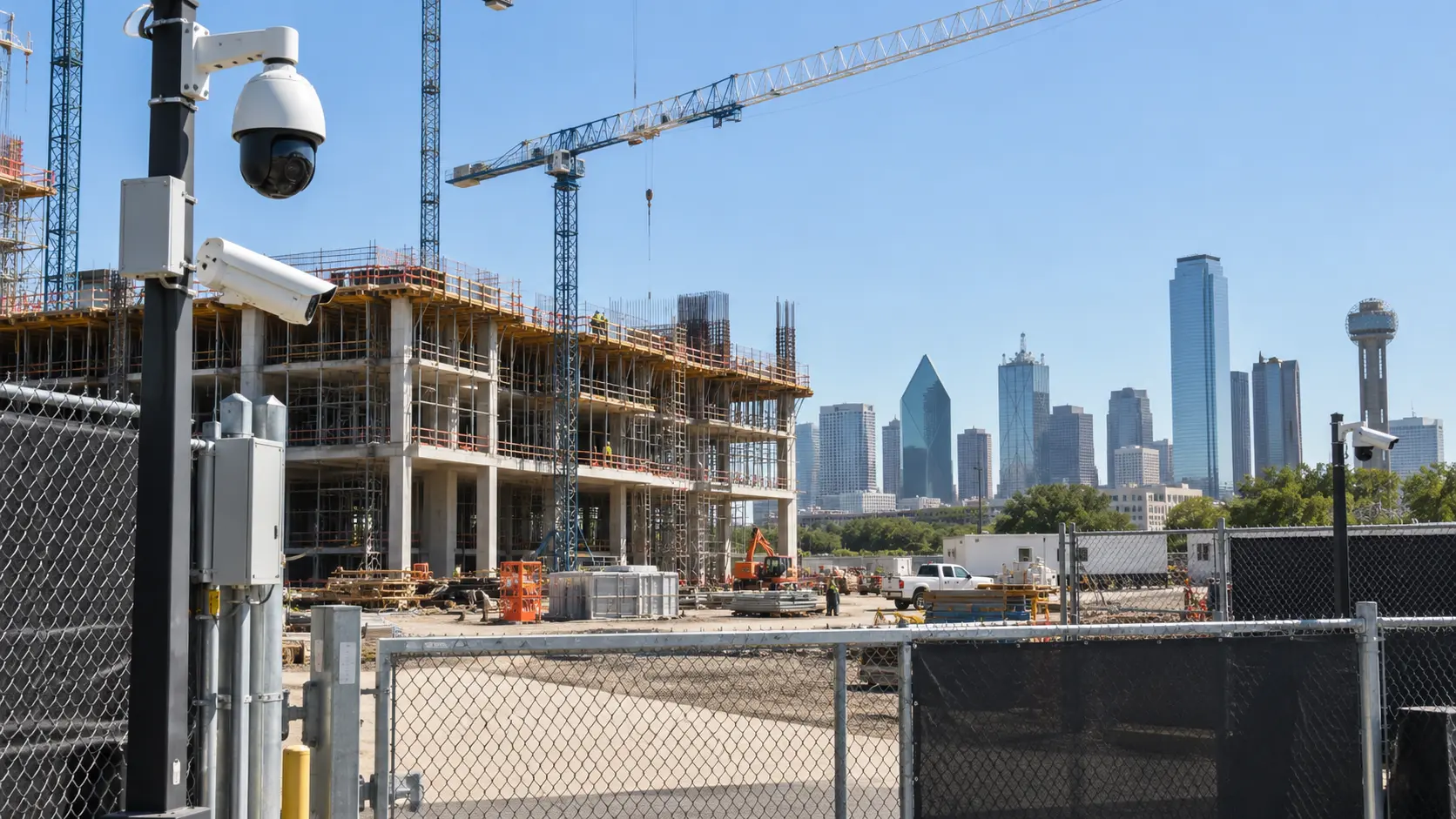
Construction Security Risks Dallas Contractors Should Consider
Before selecting cameras or security equipment, it helps to understand what you’re actually protecting against. The risks on a Dallas construction site fall into a few major categories, and each one calls for a different type of coverage.
Equipment and Material Theft
Heavy equipment, generators, and power tools can disappear from an open jobsite in minutes. Copper wiring, lumber, steel studs, and HVAC components are frequent targets across DFW sites. Cameras covering equipment storage, material laydown zones, and loading areas deter theft and provide evidence for police reports and insurance claims.
Trespassing and Unauthorized Access
Unfinished structures attract trespassers, and every unauthorized person on your site creates a liability problem. Monitoring entrances, gates, fence openings, and restricted areas shows who’s coming and going. Pair cameras with access control to limit entry and log every access event.
Vandalism and Property Damage
Damage ranges from graffiti to slashed equipment tires and cut hydraulic lines. Visible cameras and signage deter most casual vandalism. When it does happen, high-resolution night-vision footage helps identify responsible parties and supports damage claims.
After-Hours Activity
Most construction theft happens between 6 PM and 6 AM, on weekends, and over holidays. Night-capable cameras with motion detection or AI alerts flag activity when no one should be on-site, giving managers or monitoring services time to respond.
Disputes, Incidents, and Liability
Recorded video provides an objective record of accidents, property damage, and contractor disputes. Footage can verify safety compliance during OSHA investigations, support insurance reviews, and resolve disagreements about responsibility or timeline.
Security Systems for Construction Sites
Most people think of security cameras when they think about construction-site security. Cameras are important, but a well-designed system often includes several technologies working together – surveillance cameras, access control, alarms, remote viewing, and increasingly, AI-powered analytics. Here’s a closer look at each component and how it applies to construction sites specifically.
CCTV and Security Camera Systems
Security cameras are the foundation of most construction-site security systems. But “security cameras” cover a wide range of equipment, and choosing the right cameras matters more on a construction site than in a typical office or retail space because the conditions are harsher and the coverage requirements change over time. The right camera for your site depends on what you’re trying to see, how far away you need to see it, and what conditions the camera will face. A single site might use bullet cameras on the perimeter, turret cameras at entrances, and a PTZ camera covering the main equipment yard.
Construction Site Surveillance Systems
Individual cameras are useful, but the real value comes from combining them into a centralized surveillance system. This means connecting your cameras to a network video recorder (NVR) that stores footage, allows playback, and can be accessed remotely by project managers or security teams. A well-designed surveillance system gives you a single dashboard where you can view live feeds from every camera on-site, review recorded footage, and search for events based on time, location, or motion triggers. If you manage multiple construction projects across the DFW area, some NVR and VMS (video management software) platforms allow you to monitor several sites from one interface.
Access Control
Access control on a construction site works differently than in a finished office building. You’re not installing card readers on every door — you’re controlling who can get through the main gate, into the site office, into equipment storage, and into restricted areas. Depending on the site, access control might include:
- ✓Key card or fob readers on site office doors and equipment rooms
- ✓Keypads or coded locks on storage containers
- ✓Managed gate access for vehicles and personnel
- ✓Credential-based entry that logs who accessed the site and when
- ✓Temporary credentials for subcontractors that can be activated and deactivated as crews change If you’re managing a large site with multiple subcontractors rotating through, access control helps you maintain a record of who was on-site during any given shift. That record becomes valuable if something goes missing or an incident needs to be investigated. For contractors working across multiple DFW locations, access control installation in Dallas can be designed to work with your existing credentialing systems so subcontractors use the same badge across your projects.
Intrusion and Alarm Systems
Cameras show you what’s happening. Alarms tell you something is happening right now. On a construction site, intrusion alarms can be configured to trigger when a door or gate is opened after hours, when motion is detected in a restricted area, or when a perimeter sensor is tripped. These alerts can be sent to a monitoring service, a project manager’s phone, or both. Alarms complement your camera system by adding an immediate notification layer. Instead of relying on someone to be watching a live feed at the right moment, the alarm pushes the information to you.
Remote Video Monitoring
One of the most practical features for construction managers is remote access to live and recorded video. When your camera system supports remote viewing — through a phone app, web browser, or dedicated software – you can check on your site from anywhere. This is especially useful when you’re managing multiple projects. Instead of driving across Dallas to check on a site at 9 PM, you can pull up the cameras from your phone and verify that everything looks normal. Remote viewing also allows you to review footage after an incident without being physically on-site, share clips with law enforcement or insurance adjusters, and monitor deliveries or subcontractor activity during working hours.
AI Video Analytics
Some modern camera systems include AI-based analytics that go beyond simple motion detection. Instead of alerting you every time a leaf blows across the frame, AI analytics can distinguish between a person, a vehicle, and an animal – and only notify you when something relevant happens. On a construction site, useful AI applications include:
- ✓Person detection – flagging when a person enters a restricted or secured area after hours
- ✓Vehicle detection – tracking vehicles entering or leaving the site outside of normal operating hours
- ✓Perimeter crossing alerts – notifying you when someone crosses a virtual boundary you’ve defined, such as a fence line or restricted zone
- ✓Loitering detection – identifying when someone remains in a specific area for an unusual length of time
- ✓Reducing false alerts – filtering out motion from wind, animals, shadows, and headlights so you only get notifications that matter AI analytics are helpful, but they’re not magic. They reduce noise and help you focus on real events. They don’t automatically prevent crime, and they still require a system that’s properly configured for your specific site conditions.
What Are the Best Security Cameras for Construction Sites?
There’s no single “best” camera for construction sites. The right choice depends on what part of the site you’re covering, what you need to capture, and what conditions the camera will face. Here’s a practical comparison:
| Camera Type | Best Use on Construction Sites | Key Benefit |
|---|---|---|
| Bullet cameras | Perimeters, fence lines, long driveways, and corridors | Focused long-range coverage |
| Turret / Dome cameras | Entrances, gates, site offices, and general work areas | Compact, tamper-resistant, flexible viewing angle |
| PTZ cameras | Large open yards, equipment staging areas, and multi-use zones | Remote pan, tilt, and zoom from a single mount point |
| 4K / high-resolution cameras | Areas where identification and evidence detail matter | Captures faces, license plates, and fine detail |
| Night / low-light cameras | Perimeters, storage areas, and any poorly lit zones | Usable footage in darkness with IR or color night vision |
| AI-enabled cameras | Perimeters, entrances, and high-risk zones | Smarter detection — reduces false alerts, flags real events |
| Temporary / mobile cameras | Sites without permanent power, internet, or infrastructure | Rapid deployment, flexible repositioning as work progresses |
Most construction sites benefit from a combination. For example, a mid-sized commercial project in Dallas might use bullet cameras along the perimeter fencing, turret cameras at the main gate and site office, a PTZ camera overlooking the equipment yard, and night-capable cameras on the far corners of the property where lighting is weakest. The key is matching the camera to the job, not buying the most expensive option available and hoping for the best.
Where Should Security Cameras Be Installed on a Construction Site?
Camera placement is where a lot of construction-site security systems fall short. You can buy quality equipment and still miss critical activity if the cameras aren’t positioned correctly. Here are the locations that should be covered on most construction sites:
- ✓Main site entrance and exit gates — every vehicle and person entering or leaving the site should be captured on camera. This is your primary record of site access.
- ✓Equipment storage and staging areas — wherever heavy equipment, generators, or large tools are parked overnight.
- ✓Material storage and laydown areas — where lumber, steel, copper, piping, HVAC components, and other building materials are stored.
- ✓Tool storage containers and lockboxes — even if tools are locked up, a camera covering the container exterior shows who approached it and when.
- ✓Temporary site offices and trailers — these hold project plans, electronics, and personal belongings.
- ✓Parking areas — both for company vehicles and worker vehicles. Vehicle break-ins happen on construction sites more often than people expect.
- ✓Perimeter fencing — particularly sections that face roads, alleys, vacant lots, or wooded areas where someone could approach undetected.
- ✓Loading and unloading zones — where deliveries arrive and materials are moved. These areas see a lot of activity and are common points for both theft and accidents.
- ✓Building entrances — as the structure takes shape, camera coverage should extend to ground-floor openings, stairwells, and any access points into the building itself.
- ✓Blind spots — areas that aren’t visible from the site office, from the road, or from other cameras. Every site has them, and they’re usually where problems happen.
- ✓Repeat-incident locations — if you’ve had trespassing, theft, or vandalism in a specific area, that area gets a camera. Height matters. Cameras mounted too low can be tampered with. Cameras mounted too high lose detail. A typical installation height of 10 to 14 feet provides a good balance between security and image quality. Sightlines change. A camera that had a clear view during site prep may be blocked once framing goes up. The installation plan should account for how the site will look in two months, not just today. Lighting affects everything. Cameras facing strong light sources (like headlights or low sun) will struggle with glare. Cameras in unlit areas need strong IR or supplemental lighting. Field of view matters more than camera count. Ten cameras with overlapping coverage of the same area don’t help as much as six cameras positioned to eliminate blind spots. Coverage planning should be based on a site walk, not a guess from the office.
How Construction Site CCTV Camera Installation Works
Installing a security camera system on a construction site isn’t the same as wiring up a finished office building. The environment is rougher, the infrastructure is incomplete, and the system needs to work despite both of those things. Here’s what a professional installation process typically looks like:
1. Site Security Assessment
Before selecting any equipment, a security professional walks the site to evaluate the layout, identify risk areas, and understand the project timeline. The assessment covers overall site size and shape, number and location of entrances and access points, where equipment and materials are stored, current and planned lighting, existing infrastructure (power, internet, network cabling), high-risk areas based on past incidents or site geography, and how the layout will change as construction progresses. This step is important because it shapes everything that follows. A system designed around an accurate site assessment performs better and costs less than one based on assumptions.
2. Camera Placement and System Design
Based on the assessment, the system designer creates a coverage plan that maps camera locations to the areas that need monitoring. The goal is to minimize blind spots while keeping the camera count practical. This step includes selecting camera types for each location — bullet for perimeters, turret for entrances, PTZ for open yards — and planning cable routes, NVR placement, and network infrastructure. For Dallas-area construction sites where commercial security camera installation in Dallas is part of the project scope, the system design can also incorporate future expansion — adding cameras as the building progresses and eventually transitioning temporary site cameras into the permanent security system for the finished structure.
3. Camera and Equipment Installation
Installation on a construction site involves mounting cameras to poles, temporary structures, existing buildings, or purpose-built mounts. The physical installation includes mounting and securing each camera at the planned height and angle, running Ethernet cabling (for PoE cameras) or setting up wireless connections, installing and connecting the NVR or recording device, connecting power through existing electrical, temporary power, PoE, or solar/battery solutions, and protecting cabling and equipment from weather, dust, and accidental damage.
4. System Configuration
Once the hardware is in place, the system gets configured. This includes setting recording schedules, configuring motion detection zones and sensitivity levels, setting up AI analytics (person detection, vehicle detection, perimeter crossing), creating user accounts and permissions, configuring remote viewing through phone apps or web interfaces, setting up notification alerts for specific events, and defining storage retention periods.
5. Testing and Training
Before the system goes live, every camera is tested for image quality, field of view, and night performance. Recording is verified, remote access is confirmed, and alert triggers are tested. The installer also walks the project manager or site superintendent through the system — how to pull up live feeds, how to search recordings, how to adjust camera angles remotely if PTZ cameras are included, and how to respond to alerts. This step is often skipped or rushed, and it shouldn’t be. A system that nobody knows how to use doesn’t protect anything.
Security Cameras for Construction Sites With Limited Power or Internet
Not every construction site in the Dallas area has reliable power and internet from day one. Early-phase projects, greenfield developments, and sites in newly platted subdivisions often lack the electrical service, network connections, and permanent structures that a traditional hardwired camera system requires. That doesn’t mean you can’t have surveillance. It means the system needs to be designed around what’s actually available on-site. Here are the most common solutions for sites with limited infrastructure:
- ✓Solar-powered camera systems — solar panels charge batteries that keep cameras running 24/7. These work well in Dallas, where sunlight is abundant most of the year. Solar setups are typically paired with cellular connectivity so the cameras can transmit video without a wired internet connection.
- ✓Cellular-connected cameras – cameras equipped with 4G LTE (and increasingly 5G) modems transmit footage over the cellular network instead of requiring a wired or Wi-Fi internet connection. This is often the simplest way to get remote viewing on a site where running internet service would be expensive or impractical.
- ✓Temporary and mobile camera systems – self-contained camera units mounted on trailers, poles, or portable towers. These can be deployed in hours, repositioned as work progresses, and removed when the project is complete.
- ✓Wireless point-to-point bridges – if one part of the site has internet access, a wireless bridge can extend that connection to cameras across the site without running Ethernet cable through an active construction zone. Not every site without power needs a solar trailer. Some sites get temporary electrical service early in the project, and a standard PoE camera system can be installed once that power is available. The goal is to match the solution to the actual site conditions – not to over-engineer the setup when a simpler option works. Conversely, don’t assume a consumer-grade solar camera from a big-box store will hold up on a commercial construction site. These consumer units are designed for residential driveways, not for covering a 5-acre jobsite with 24/7 recording. Commercial-grade equipment is built for the conditions and the workload.
Temporary vs. Permanent Construction Site Security Cameras
One of the first decisions on a construction security project is whether you need temporary cameras, permanent cameras, or both.
| Feature | Temporary Security Cameras | Permanent Security Cameras |
|---|---|---|
| Project fit | Short-term projects, early-phase sites | Long-term projects, final building security |
| Deployment | Quick setup, often same-day | Requires structured installation and cabling |
| Flexibility | Can be moved as construction progresses | Fixed camera locations |
| Infrastructure | Works before permanent power/internet | Integrated with permanent building systems |
| Layout changes | Adapts to changing site conditions | Designed for completed structures |
| Cost model | Rental or short-term purchase | Capital investment, long-term value |
| Typical use | Site security during construction only | Building security after construction is complete |
Many projects benefit from a phased approach. Temporary cameras protect the site during construction, and as the building reaches completion, permanent cameras are installed as part of the finished security system. In some cases, temporary camera infrastructure – like conduit runs or mounting locations – can be planned so that the permanent system reuses some of the same pathways. If you’re building a commercial facility in the Dallas area and plan to install a permanent security system in the finished building, it’s worth discussing both phases up front. Designing the temporary and permanent systems together often saves time and money compared to treating them as separate projects.
Benefits of Professional Construction Site Security Systems
A well-designed construction-site security system does more than record video. It changes how you manage and protect your site on a daily basis.
- ✓Deters unauthorized activity — visible cameras and surveillance signage make it clear that the site is being watched.
- ✓Improves visibility across large sites — cameras extend a superintendent’s eyes to every corner of the property.
- ✓Monitors equipment and materials around the clock — a visual record of activity around high-value assets day and night.
- ✓Enables remote incident review — review footage from your phone the next morning instead of guessing what occurred.
- ✓Creates video evidence — recorded footage supports police reports, insurance claims, and legal proceedings.
- ✓Reduces security blind spots — a coverage plan that maps cameras to blind spots eliminates easy targets.
- ✓Supports site management — verify deliveries, document contractor activity, monitor safety compliance, and resolve disputes.
- ✓Adapts as the project changes — cameras can be repositioned or added as the site evolves.
- ✓Integrates with other security layers — cameras, access control, alarms, and remote monitoring reinforce each other. The return isn’t theoretical. A single prevented theft or a single insurance claim supported by clear video footage can justify the cost of the entire system.
Security Systems for Different Types of Construction Projects
Construction security isn’t one-size-fits-all. The type of project, its location, size, and stage all influence what kind of system makes sense.
Commercial Construction Sites
Office buildings, retail centers, medical facilities, and mixed-use developments typically have defined perimeters, multiple access points, and high-value mechanical and electrical equipment on-site. These projects usually justify a comprehensive camera system covering the perimeter, all entrances, equipment storage, and material laydown areas. Access control for the site office and restricted zones is common. Many commercial projects in Dallas also require documented security measures for insurance or contract compliance.
Residential Construction Projects
Custom home builds and smaller residential projects have a different risk profile. The site is typically smaller, but tools, appliances, and finish materials are still targets — especially as the project nears completion and high-value items like cabinetry, fixtures, and HVAC units are installed. A few well-placed cameras covering the driveway, main entrance, and material storage area often provide adequate coverage.
Apartment and Multifamily Construction
Multifamily projects — apartment complexes, townhome communities, senior living facilities — tend to be large, long-duration builds with extensive perimeters and multiple buildings under construction simultaneously. The security system needs to scale with the project. Early phases may rely on temporary cameras and cellular connectivity, transitioning to permanent systems as buildings are completed.
Road and Infrastructure Projects
Highway construction, bridge work, utility projects, and municipal infrastructure jobs cover long stretches of ground and often lack traditional perimeters entirely. Security for these projects focuses on protecting equipment staging areas, monitoring traffic control zones, and deterring theft from material storage sites. Mobile and solar-powered cameras are frequently the best fit because the work zone moves as the project progresses.
Industrial Construction
Manufacturing facilities, processing plants, and industrial buildings often have specialized equipment — electrical switchgear, transformers, large mechanical systems — that represents a significant investment and a serious target for copper theft. Camera systems for industrial sites often include higher-resolution cameras for equipment identification and integration with access control and alarm systems.
Warehouse and Distribution Construction
The Dallas–Fort Worth area has seen massive growth in warehouse and distribution center construction, especially along the I-35 and I-20 corridors. These are typically large, flat sites with wide-open perimeters and major equipment on-site. The scale of these sites often calls for PTZ cameras and long-range bullet cameras to cover the distances involved.
Large Development Projects
Master-planned communities, mixed-use developments, and campus-style projects involve multiple buildings, phases, and contractors over extended timelines. Security for these projects needs to be modular — starting with temporary systems on the first phase and expanding as new sections break ground. A centralized video management platform allows the developer or general contractor to monitor the entire project from a single interface.
Security in DFW Construction Site Security Solutions
Security in DFW provides design, installation, and support for construction-site security systems across Dallas and the surrounding DFW metro area. We work with general contractors, builders, developers, and project managers to put the right security in place based on what your site actually needs — not a cookie-cutter package. Our construction-site security services include:
- ✓Site security assessment — we walk your site, identify risk areas, evaluate existing infrastructure, and develop a security plan based on the layout and project timeline.
- ✓Security camera system design — camera selection, placement planning, and coverage mapping designed to minimize blind spots and maximize useful footage.
- ✓CCTV and IP camera installation — professional installation including camera mounting, cabling, NVR setup, power connections, and weather protection.
- ✓Access control — card readers, keypads, managed gate access, and credential systems for site offices, equipment rooms, and restricted areas.
- ✓Alarm integration — intrusion detection and alarm systems that complement your camera coverage with real-time alerts.
- ✓Remote viewing setup — configuration of phone apps, web access, and remote monitoring so you can check on your site from anywhere.
- ✓System configuration and AI analytics — motion detection zones, person/vehicle detection, perimeter alerts, recording schedules, and user permissions.
- ✓Ongoing support and service — system maintenance, troubleshooting, camera repositioning as the project progresses, and system upgrades. We serve construction projects throughout the DFW area, including Dallas, Fort Worth, Arlington, Plano, Frisco, McKinney, Irving, Grand Prairie, Denton, and surrounding communities. Whether you’re breaking ground on a commercial office building in Uptown, a warehouse near DFW Airport, or a residential development in the northern suburbs, we design systems based on the specific conditions of your site. Ready to discuss security for your construction project? Contact Security In DFW for a site assessment and a customized security recommendation built around your project’s layout, timeline, and requirements.
Choosing the Right Construction Site Security System in Dallas
There’s no universal formula for construction-site security. The right system depends on your specific project. But here are the factors that should drive the decision:
- ✓Site size – a half-acre lot and a 20-acre development have very different coverage requirements.
- ✓Number of entrances and gates – every entry point needs coverage.
- ✓Perimeter length – longer perimeters need more cameras or longer-range optics.
- ✓Equipment and material value – higher-value sites justify more comprehensive systems.
- ✓Lighting conditions – well-lit sites are easier to cover than dark perimeters surrounded by vacant land.
- ✓Power availability – do you have permanent electrical service, temporary power, or nothing at all?
- ✓Internet availability – is there a wired connection, or will the system need cellular connectivity?
- ✓Project duration – a 6-month build and a 3-year phased development need different approaches.
- ✓Number of workers and subcontractors – more people on-site means more access management challenges.
- ✓Recording duration requirements – how many days of footage do you need to retain?
- ✓Remote viewing needs – do project managers need to view cameras from off-site?
- ✓Access control requirements – do you need controlled entry for gates, offices, or restricted areas?
- ✓AI analytics – would person detection, vehicle detection, or perimeter alerts reduce false alarms and improve response?
- ✓Future expansion – will the system need to grow as the project progresses or transition into a permanent installation? A common mistake is choosing cameras based solely on resolution or price without considering the full picture. A 4K camera is useless if it’s pointed in the wrong direction, and a cheap system that fails in three months costs more in the long run than a well-designed system that works reliably throughout the project. The most effective approach is to start with a professional site assessment. An experienced installer can identify risks and recommend equipment based on what your site actually looks like – not what a product listing assumes.
Construction Site Security FAQs
The best cameras for construction sites are commercial-grade IP cameras rated for outdoor use. Bullet cameras work well for perimeters and long-range views. Turret or dome cameras are a good fit for entrances and general areas. PTZ cameras cover large open yards. Night-vision capability is essential since most theft happens after dark. The best system typically uses a combination of camera types selected for each specific location on the site.
It depends on the site’s size, layout, and risk areas. A small residential construction project might need 4 to 6 cameras. A large commercial site could require 16 to 30 or more. The number should be based on a coverage plan that accounts for entrances, perimeter, equipment storage, material storage, blind spots, and areas with a history of incidents. Camera count alone doesn’t determine coverage quality — placement and field of view matter more.
Priority locations include the main entrance and exit gates, equipment and material storage areas, tool storage containers, site offices and trailers, parking areas, perimeter fencing, loading zones, building entrances, and any blind spots or areas with repeated unauthorized activity. Camera placement should be based on an on-site assessment that considers sightlines, lighting, mounting height, obstructions, and how the site layout will change as construction progresses.
Yes. Cameras can record locally to an NVR or onboard storage without any internet connection. If you also need remote viewing, cellular-connected cameras use 4G LTE to transmit video over the cellular network instead of a wired or Wi-Fi internet connection. This is a common solution for early-phase sites and remote locations in the DFW area that don’t have internet service yet.
Yes. Solar-powered camera systems use solar panels and batteries to operate independently of grid power. These work well in the Dallas area, where sunlight is generally reliable year-round. Some systems combine solar panels, batteries, cameras, and cellular modems into self-contained portable units. The key is using commercial-grade solar equipment sized for 24/7 operation, not consumer-grade panels designed for intermittent use.
Yes, when the system is configured for remote access. Most commercial NVRs and IP camera systems support remote viewing through phone apps, web browsers, or dedicated software. You can view live feeds, search recorded footage, and receive alerts from anywhere with an internet or cellular connection. This is one of the most-requested features for construction managers overseeing multiple projects.
Yes. Temporary camera systems are designed specifically for sites that don’t have permanent infrastructure. They can be deployed quickly, repositioned as the site changes, and removed when the project is complete. Options range from individual solar/cellular cameras to full temporary surveillance packages with multiple cameras, NVR recording, and remote viewing.
They can, especially if the system is designed with flexibility in mind. Temporary camera mounts, portable poles, and wireless connectivity make it easier to reposition cameras as the site layout changes. For hardwired cameras, repositioning requires re-running cable, so it’s more involved. Planning camera placements around the full construction timeline helps minimize the number of moves needed.
Yes. Modern IP-based camera systems can integrate with access control readers, keypads, and alarm panels. This allows you to link video footage to access events – for example, pulling up the camera feed for a specific gate at the exact time an access card was used. Integrated systems provide a more complete security picture than cameras, access control, and alarms operating independently.
The cost of a construction-site camera system depends on several factors: the number of cameras needed, the camera types and resolution, whether the site has existing power and internet, the amount of cabling or wireless infrastructure required, NVR and storage capacity, installation complexity, and whether temporary or permanent equipment is used. A small site with 4 to 6 cameras and existing power will cost significantly less than a large commercial site with 20+ cameras, solar power, cellular connectivity, and access control. Because every site is different, the most accurate way to get pricing is to request a site assessment so the system can be designed around your actual requirements.
Protect Your Dallas Construction Site With a Professionally Designed Security System
Your construction site has enough variables to manage without worrying about whether your equipment, materials, and unfinished work will still be there in the morning. Security In DFW designs and installs construction-site security systems that are built around the realities of active jobsites – changing layouts, limited infrastructure, after-hours vulnerability, and the need for reliable coverage across every phase of the project. Whether you’re a general contractor breaking ground on a new commercial project, a developer managing a multi-phase build, or a builder looking to protect a single site, we can help you put the right system in place. Request a construction-site security assessment. We’ll walk your site, evaluate the risks, and provide a customized security recommendation based on your project’s size, layout, timeline, and specific requirements. Call Security in DFW to discuss your construction project and get started.